Welcome aboard. This page is your setup guide and your reference afterward. Connect your practice software, add the Nifty Bot connector to Grok or Claude, then ask questions like "Did we hit goal this month?" and get answers from your real numbers.
Do this on the computer that runs Open Dental. TeamCare reads your schedule, production and treatment from it. Nothing is changed in Open Dental.
About 5 minutes, then your history loads on its own.
1. Copy your key from TeamCare
Sign in to TeamCare. The Connect your data step shows your practice's Open Dental key.
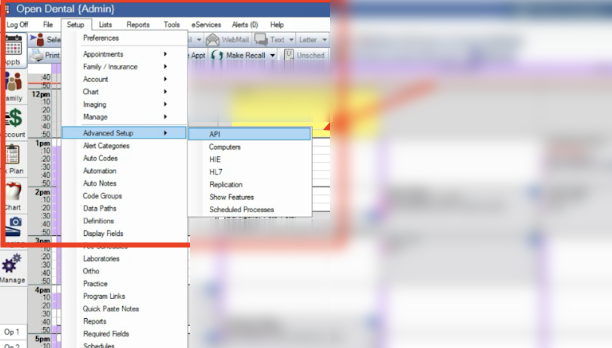
2. In Open Dental, go to Setup › Advanced Setup › APIPatient details in this screenshot are blurred.
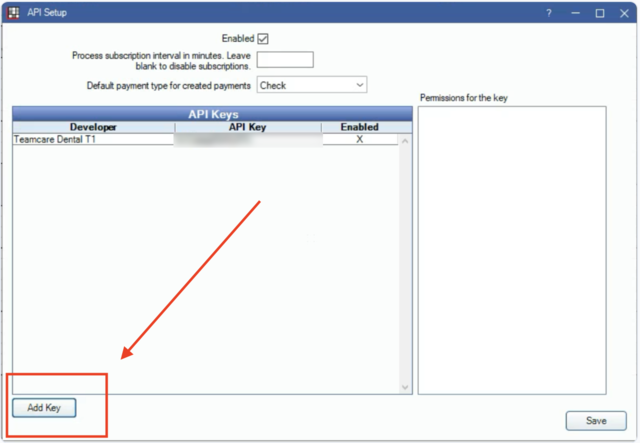
3. Click Add Key, bottom left
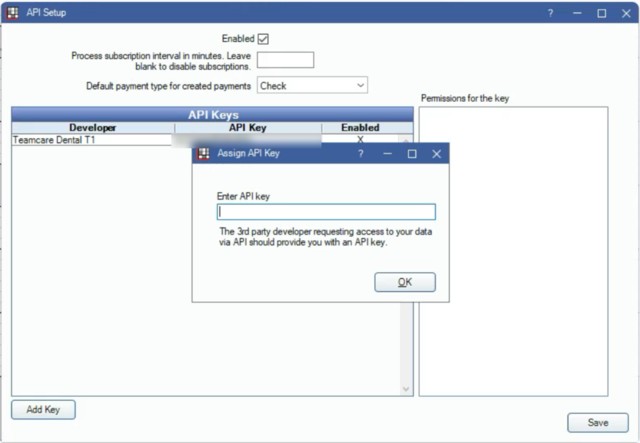
4. Paste your key and click OK
5. Back in TeamCare, wait for the green check
Waiting for Open Dental…The TeamCare page checks on its own. Keep it open for a minute.
✓ Open Dental connectedTeamCare loads up to 24 months of history. You'll get an email when it's done, usually within a few hours.
Using different practice software? The Connect your data step shows the steps for yours, or reply to any Nifty Bot email and we'll set up a time with you.
Step 2
Add the Nifty Bot connector
The connector lets your AI assistant read your TeamCare numbers. Set it up once, sign in with your Nifty Bot login, and you're done. You can do this before your data finishes loading.
About 3 minutes.
1. Before you start
You need the Grok app and the login from your welcome email.
2. Add the connector
In Grok, open Connectors › Add custom MCP, name it Nifty Bot, and paste this address.
https://app.teamcaredental.com/mcp/nifty
3. Sign in
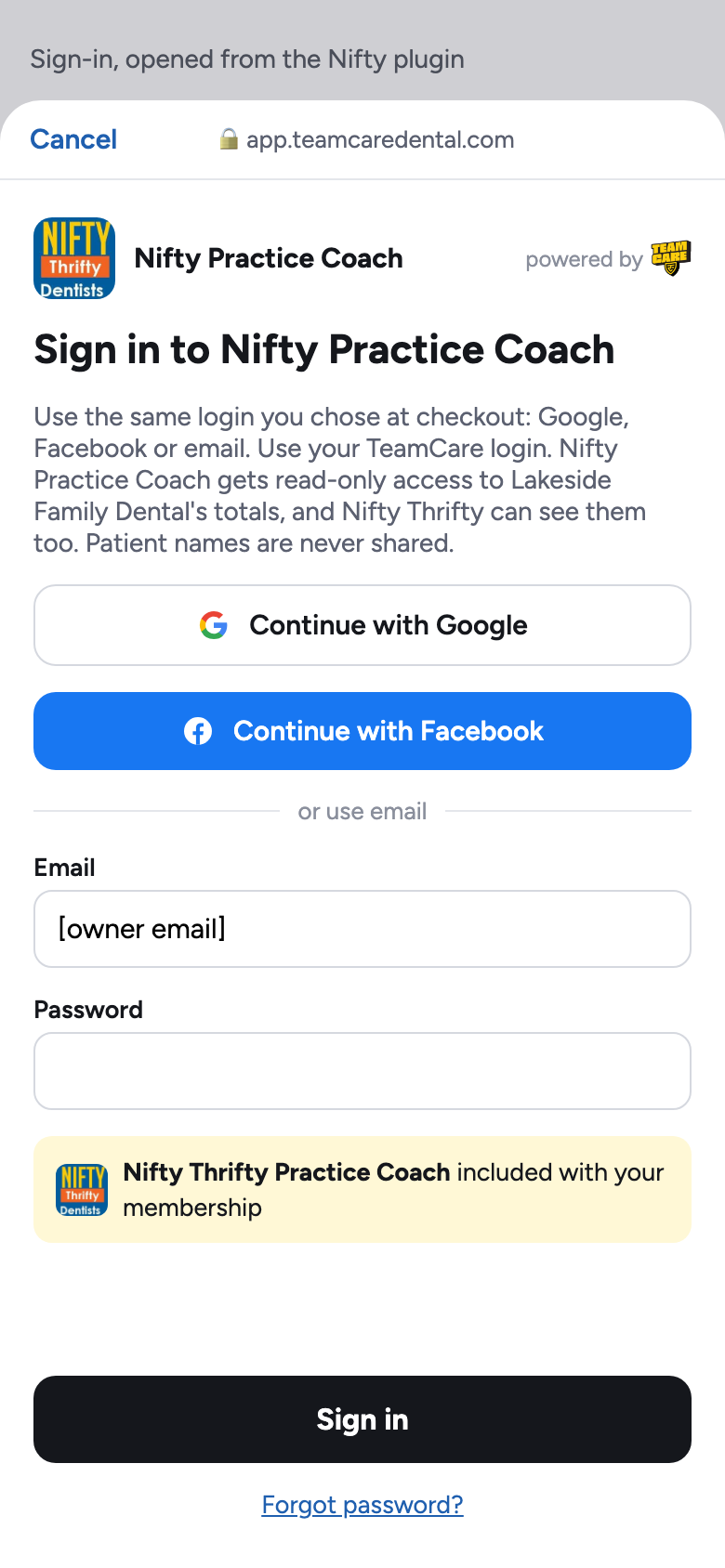
Tap Sign in and use the email and password from your welcome email.
4. Ask "Run my weekly scorecard."
Team members can connect too. Each one signs in with their own login and sees only what their role allows.
Step 3
Start using it
Ask in plain English. Nifty Bot shows which TeamCare numbers it's reading, answers, and ends with one thing to do this week.
Try it here with sample numbers: pick a question.
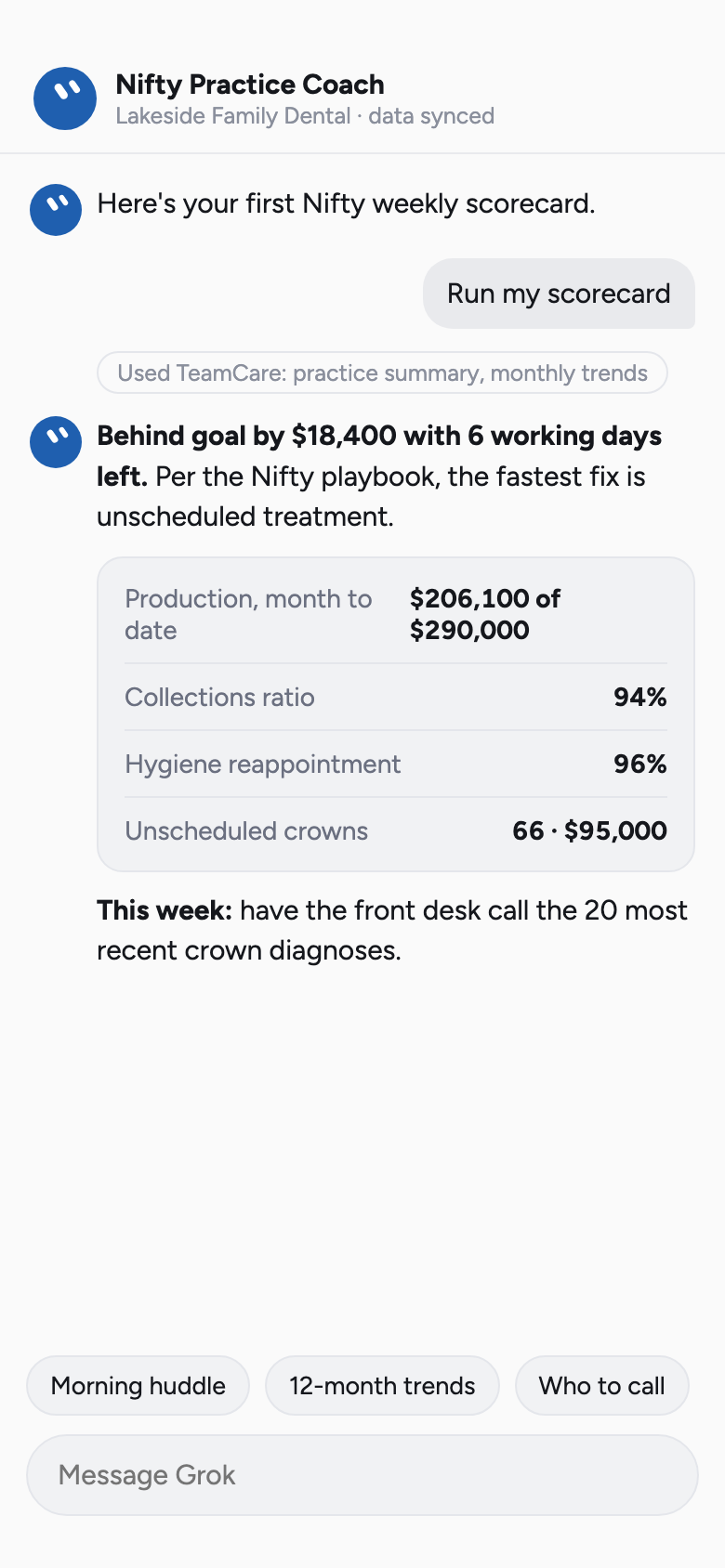
Your first weekly scorecard in Grok
Ask "Run my scorecard." Nifty Bot pulls your month to date, compares it with goal, and ends with the one thing to do this week. The numbers here are a demo practice's.
Nifty Bot Lakeside Family Dental (Demo)Sample data
Pick a question to see how Nifty Bot answers it.
These answers use a demo practice. Yours will use your own numbers once your data has synced.
A simple weekly rhythm
Practices that get the most from Nifty Bot use it on a schedule. Here's the Nifty rhythm.
Monday morningRun my weekly scorecard.
Where you stand against goal, and the one fix that matters most this week.
Every morningGive me today's huddle.
Appointments, confirmations, and who's due for hygiene or has treatment waiting.
MidweekWho should we call about unscheduled treatment?
Diagnosed work that isn't booked yet, starting with the most recent.
Month endDid we hit goal this month?
Production and collections against goal, compared with last month.
Any timeWhere are my open slots today and tomorrow?
Unbooked chair time, so overdue recall patients can fill it.
QuarterlyShow our 12-month trends.
Month by month against goal, so seasonal dips don't surprise you.
What Nifty Bot never sees or does
Patient names, birthdays, phone numbers, emails, addresses or insurance IDs. Answers are counts and dollars.
Anything your role can't open. A front desk login can't read financials through Nifty Bot either.
Anything that changes your practice. It can't book, cancel, message patients or edit Open Dental.
Every question is logged. Owners can see what was read under Analytics › MCP Connector, and disconnect anyone from Profile › Authorized Apps.
If something's not right
Nifty Bot says there's no data yet
Your history is still loading from Open Dental. You'll get an email when it's done. If it's been more than a day, check that the key is still assigned in Open Dental's API window.
Sign-in doesn't work
Use the email and password from your welcome email, or use "Forgot password" on the sign-in screen.
It shows the wrong practice
Disconnect the connector, connect again, and pick the right practice on the sign-in screen.
I want my office manager to use it too
Add them as a team member in TeamCare, then have them follow Step 2 with their own login. They'll see only what their role allows.
Who do I ask for help?
Reply to any Nifty Bot email. It goes to Glenn Vo at Nifty Thrifty Dentists, and support is copied.